

How to Set Up a Custom Domain with Dynamic DNS
Aug 11, 2026
Why your IP address changes
Most home internet connections get a dynamic IP address from the ISP. Your public IP can change when your router reboots, when the ISP rotates its address pool, or after a power outage. If you give your players your current IP and it changes a week later, they cannot connect anymore until you send them the new one.
Dynamic DNS solves this: you get a domain name (like myserver.duckdns.org or play.mydomain.com), and a small updater tells the DNS provider whenever your IP changes. Players always use the domain name, and it always points to the right address. Coalstack has this updater built in for both DuckDNS and Cloudflare.
Setting up DuckDNS (free)
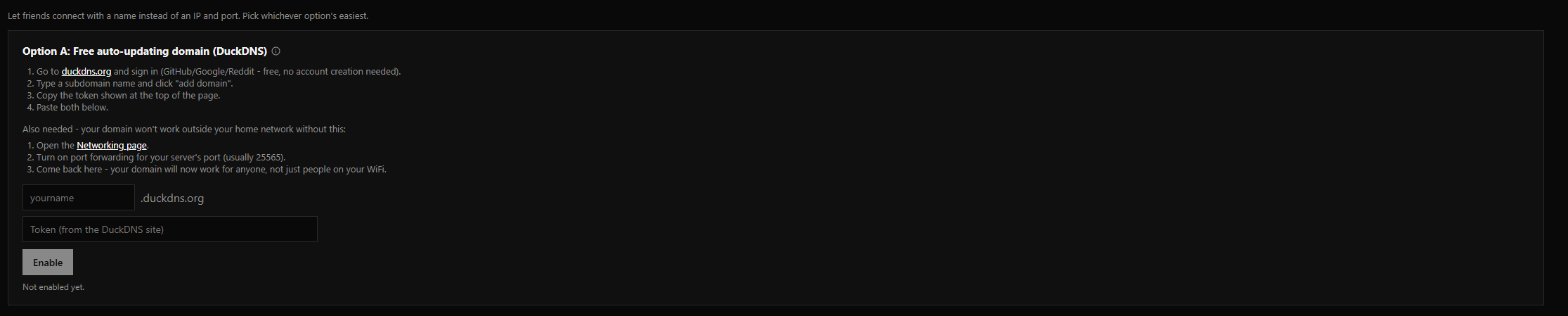
DuckDNS is a free dynamic DNS service. You get a subdomain under duckdns.org and a token that lets Coalstack update the IP for you.
- Go to duckdns.org and sign in with a Google, GitHub, or Reddit account.
- Create a subdomain (like
myserver). It will be reachable atmyserver.duckdns.org. - Copy the token string from the top of the page.
- In Coalstack, open your server and go to Networking. In the Dynamic DNS section, pick DuckDNS, paste your subdomain and token, and save.
Coalstack pings DuckDNS's update API every 5 minutes with your current public IP. If your IP changes, the DNS record updates within that window. The domain shown on the server card updates automatically.
Setting up Cloudflare (your own domain)
If you already own a domain and it uses Cloudflare for DNS, Coalstack can update an A record automatically when your IP changes.
- Log into the Cloudflare dashboard and go to your domain. In the DNS settings, create an A record pointing at any IP for now (Coalstack will overwrite it). Name it something like
playso your address becomesplay.yourdomain.com. - Create an API token: go to My Profile > API Tokens, click Create Token, and use the "Edit zone DNS" template. Scope it to your domain. Copy the token.
- In Coalstack, open your server, go to Networking, and pick Cloudflare in the Dynamic DNS section. Paste your API token, root domain (like
example.com), and record name (likeplay).
Coalstack updates the A record every 5 minutes, same as DuckDNS. Players connect using the domain name you configured, and it always resolves to your current IP.